

Documentation Index
Fetch the complete documentation index at: https://docs.keystn.com/llms.txt
Use this file to discover all available pages before exploring further.
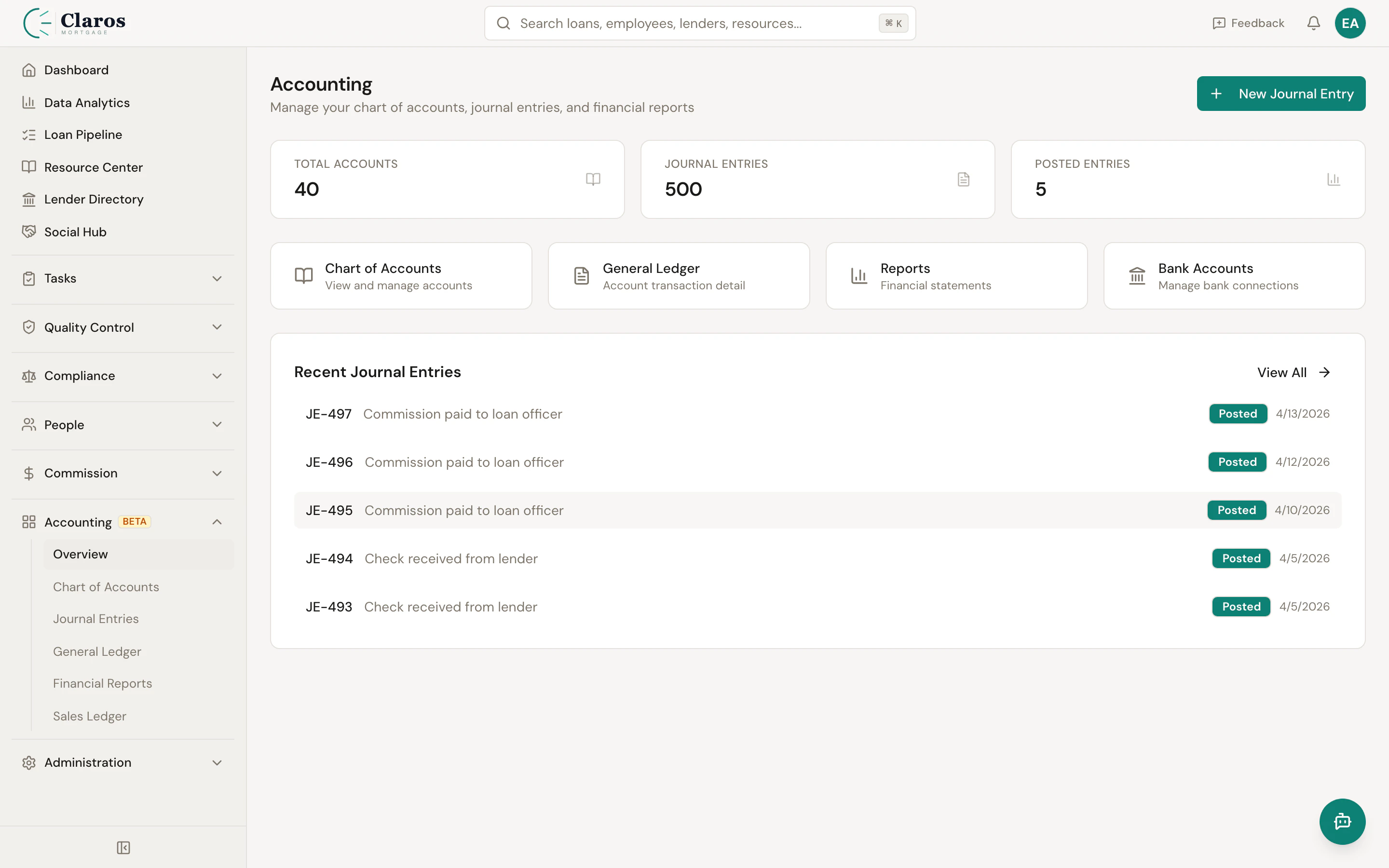
Why accounting in Keystone?
Mortgage companies deal with a specific set of financial events that repeat on every loan: funding disbursements, check receipts from lenders, commission payouts to loan officers, draw repayments, and various fee collections. Rather than re-entering these transactions in a separate accounting system, Keystone can generate journal entries automatically as loans move through your pipeline. This means:- Your books stay current with your operations in real time
- Manual data entry errors are reduced
- Financial reports reflect the latest loan activity without delay
- You have a single source of truth for both operations and accounting
Double-entry bookkeeping basics
Keystone uses double-entry bookkeeping, the standard accounting method used worldwide. The fundamental rule is simple: every financial transaction must have equal debits and credits.The accounting equation
Debits and credits
The terms “debit” and “credit” do not mean “good” or “bad.” They are simply the two sides of every transaction:| Account Type | Debit Increases | Credit Increases |
|---|---|---|
| Asset | Yes | No (decreases) |
| Expense | Yes | No (decreases) |
| Liability | No (decreases) | Yes |
| Equity | No (decreases) | Yes |
| Revenue | No (decreases) | Yes |
Example: Lender check received
When your brokerage receives a $5,000 check from a lender for a funded loan:| Account | Debit | Credit |
|---|---|---|
| Cash - Operating (Asset) | $5,000 | |
| Broker Compensation Revenue (Revenue) | $5,000 |
How it all fits together
The accounting module is organized into several interconnected parts:- Chart of Accounts — You define the accounts your company uses (cash, receivables, revenue, expenses, etc.). Keystone provides a default chart of accounts you can initialize with one click, or you can build your own from scratch.
- Account Mappings — You configure which accounts should be debited and credited for each type of loan event (funding, check receipt, commission payment, etc.). This is a one-time setup.
- Journal Entries — Financial transactions are recorded as journal entries. They can be created manually for one-off transactions, or generated automatically by the system when loan events trigger mapped accounts. Every entry starts as a Draft and must be Posted to affect your books.
- General Ledger — The general ledger shows the full transaction history for any account over a date range, including a running balance. This is your detailed audit trail.
- Financial Reports — The Trial Balance, Balance Sheet, and Income Statement are generated on demand from posted journal entries. They provide point-in-time and period-based views of your company’s financial position.
- Bank Accounts and Reconciliation — Bank accounts in Keystone are linked to chart of accounts entries. Bank transactions can be imported and matched against journal entries through the reconciliation workflow.
Accounting workflow for a typical loan
Here is a simplified view of the accounting events that occur over the life of a mortgage loan:- Loan Funded — When a loan reaches the “Funded” status, an automatic journal entry debits Accounts Receivable and credits Deferred Revenue (or similar accounts per your mappings).
- Check Received — When the lender’s check arrives and the loan moves to “Check Received,” a journal entry debits Cash and credits Accounts Receivable, clearing the receivable.
- Commission Accrual — Commission obligations to loan officers and other team members are accrued based on the commission engine’s calculations.
- Commission Payment — When commissions are paid out, a journal entry debits Commission Expense and credits Cash (or a payable account).
- Adjustments — Loan-level adjustments (reimbursements, fee corrections, etc.) generate their own journal entries using the configured account mappings.
Getting started
If you are setting up accounting in Keystone for the first time:- Initialize or create your Chart of Accounts — Navigate to Accounting > Chart of Accounts and either click “Initialize Chart of Accounts” for a mortgage-industry default set, or add accounts manually.
- Configure Account Mappings — Set up the debit and credit accounts for each loan event type so that automatic journal entries are created correctly.
- Set your Fiscal Year — If your fiscal year does not start on January 1, configure the start month and day in Settings.
- Connect Bank Accounts — Add your bank accounts and link them to the corresponding chart of accounts entries.
- Start recording transactions — As loans flow through the pipeline, journal entries will be generated automatically. Use manual journal entries for anything not covered by mappings.
- Reconcile and report — Periodically reconcile your bank accounts and generate financial reports to review your company’s financial health.